Financial integrity matters more than ever in clinical research. At CRIO, we’re excited to introduce a refreshed finance module, built to align with GAAP (Generally Accepted Accounting Principles) and deliver more accurate, auditable, and flexible workflows.

If you’re managing clinical trial finances using static spreadsheets or legacy systems, here are some reasons why this update should be on your radar.

Invoicing is More Transparent

A screenshot of the CRIO finance module’s “Invoiceable Items” view under the Invoices tab, showing a list of items for subject 456 with service dates and payment details.Top navigation tabs (horizontal):ReconciliationInvoices (selected)CostsConfigurationSub-header:“Overview” | Invoiceable Items (selected, with help icons next to both)Main content area:Title: Invoiceable ItemsDropdown: Show 10 EntriesSearch bar: “Search by Subject ID” with magnifying glass icon and Filter icon to the rightPagination: “Previous” and “Next” buttons with page 1 selectedTable Columns:Revenue TypeSubjectItemService DateInvoiceTypeAmountOpen BalanceTable Rows (4 total):Procedure | 456 | Visit 3 – : Female subject | 22-APR-2025 | – | Upfront | $9 | $9Procedure | 456 | Visit 2 – main visit: Female subject | 19-APR-2025 | – | Upfront | $9 | $9Visit | 456 | Visit 1 – screening | 18-APR-2025 | – | Upfront | $900 | $900Procedure | 456 | Visit 1 – screening: Female subject | 18-APR-2025 | – | Upfront | $9 | $9Footer:“Total Amount: $927”

CRIO’s new finance module displays each revenue component (like upfront fees and holdbacks) as separate line items.

With this update, you get a clearer view of what’s been invoiced, what’s still outstanding, and how each charge is structured, making it easier to track billing and communicate with sponsors.

Apply Multiple Payments to Individual Autopay and Invoiceable Items
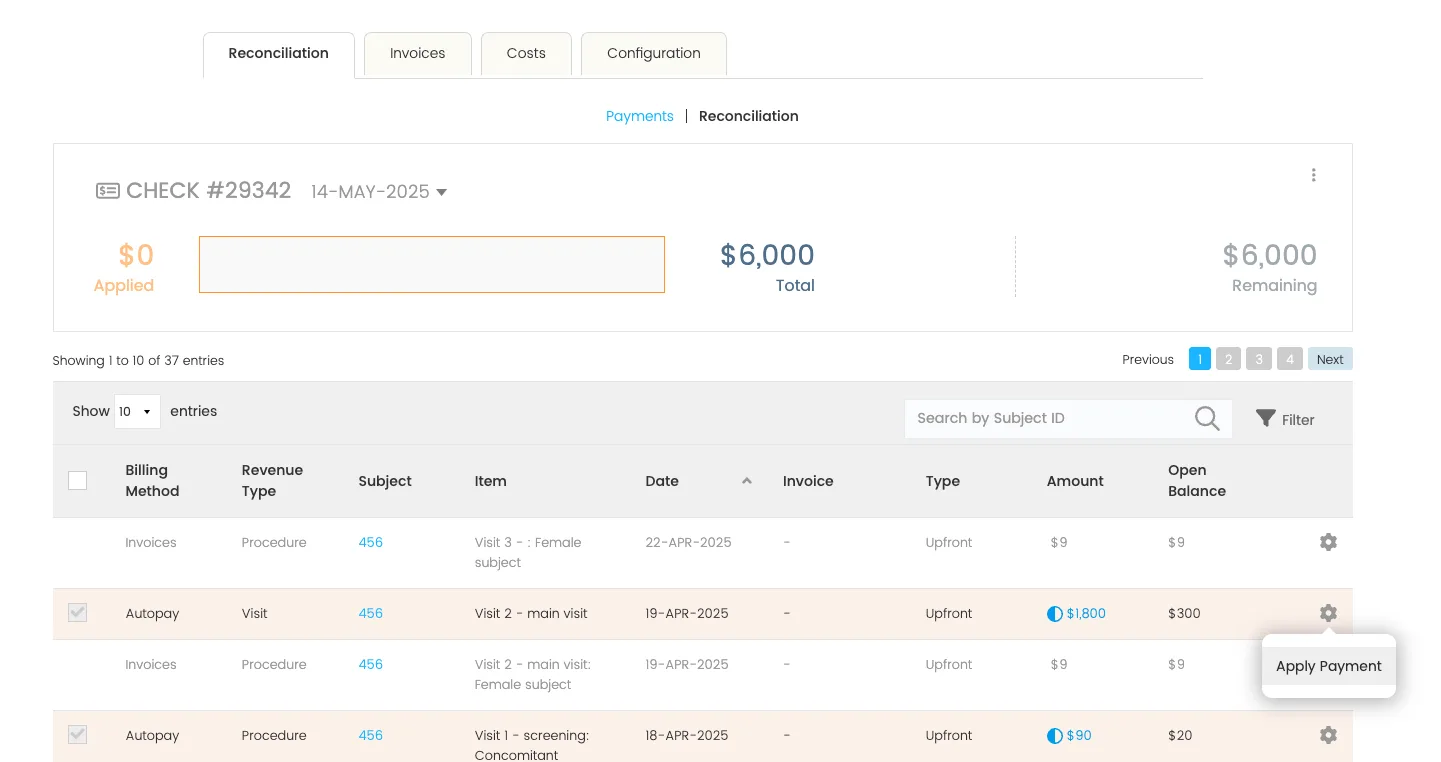
A screenshot of the CRIO finance module’s Reconciliation tab, displaying payment application for Check #29342 dated 14-MAY-2025.Top navigation tabs:Reconciliation (selected)InvoicesCostsConfigurationSub-navigation (blue text):PaymentsReconciliation (selected)Check summary panel:Title: “CHECK #29342 – 14-MAY-2025”Left section: Orange box showing $0 AppliedCenter: Empty input fieldRight section: “$6,000 Total” and “$6,000 Remaining” in blueTable section:Dropdown: Show 10 EntriesSearch bar labeled “Search by Subject ID” with Filter iconPagination buttons: Previous | 1 (selected) | 2 | 3 | 4 | NextTable Columns:Billing MethodRevenue TypeSubjectItemDateInvoiceTypeAmountOpen BalanceFirst 4 table rows shown:Invoices | Procedure | 456 | Visit 3 – : Female subject | 22-APR-2025 | – | Upfront | $9 | $9Autopay | Visit | 456 | Visit 2 – main visit | 19-APR-2025 | – | Upfront | $1,800 (with blue info icon) | $300Invoices | Procedure | 456 | Visit 2 – main visit: Female subject | 19-APR-2025 | – | Upfront | $9 | $9Autopay | Procedure | 456 | Visit 1 – screening: Concomitant | 18-APR-2025 | – | Upfront | $90 (with blue info icon) | $20Tooltip (bottom-right):Floating action bubble near the gear icon reads: “Apply Payment”

Previously, CRIO only supported multiple payments for invoiceable items at an invoice level. With this update, users may now apply multiple payments at an invoiceable item level.

This change supports complex payment situations, including staggered sponsor payments, split checks, or mid-study transitions.

Reconciliation Is Streamlined

A screenshot of the CRIO finance module’s Reconciliation tab, showing applied payments for Check #123 dated 03-DEC-2024.Top navigation tabs:Reconciliation (selected)InvoicesCostsConfigurationSub-navigation (blue text):PaymentsReconciliation (selected)Check summary panel:Title: “CHECK #123 – 03-DEC-2024”Left section: Orange box labeled $2,010 AppliedCenter: Horizontal orange-filled progress bar with an editable input fieldRight section: “$3,000 Total” and “$990 Remaining” in blueTable section:Dropdown: Show 10 EntriesSearch bar: “Search by Subject ID” with magnifying glass icon and Filter iconPagination buttons: Previous | 1 (selected) | NextTable Columns:Billing MethodRevenue TypeSubjectItemDateInvoiceTypeAmountOpen BalanceFirst 4 table rows:Autopay | Procedure | FS | Visit 1 – screening: Concomitant Medications (CVS) | 03-DEC-2024 | – | Upfront | $100 (with blue info icon) | $90Autopay | Visit | FS | Visit 2 – main visit | 03-DEC-2024 | – | Upfront | $2,000 | $0Invoices | Procedure | 234 | Visit 1 – screening: Female subject | 06-JAN-2025 | – | Upfront | $10 | $10Invoices | Procedure | 234 | Visit 1 – screening | 06-JAN-2025 | – | Upfront | $1,000 | $1,000

All revenue items (holdbacks, autopays, invoiceables) are now visible in a single, filterable table. You can search, sort, and bulk reconcile from one place, without jumping between tabs or modules.

Your team spends less time chasing down open items leading to a faster and cleaner month-end closing with fewer errors. When a revenue item is updated, whether the amount changes, a visit is rescheduled, or a correction is made, CRIO now creates a new transaction entry only if the service occurred in a prior month. In these cases, the new transaction is reflected in the current month, and the original service remains untouched in the prior month.

Smarter Reporting

A screenshot of the CRIO finance reporting dashboard, showing the “Revenue Transaction Details” tab filtered to display revenue activity for “Product Test Site” within the last 12 months.Top navigation links (horizontal blue text):RevenueRevenue DetailsRevenue Transaction Details (selected)Forecast Revenue ModelingOpen AccrualsHistorical PaymentsPayment DetailsHistorical InvoicesVendor DetailsPatient StipendsPatient Stipend DetailsStipend CardsFilters bar below navigation:Site: is Product Test SiteStudy: is any valueActive Studies: Is YesService Date: is in the last 12 monthsTransaction Date: is in the last 12 monthsIs Paid: is any valueBilling Method: is any valueRevenue Type: is not Overpay or OtherStudy Finance Configured: is YesType: is any valueMain data table header:Columns include:Site NameStudy NameSubject IDSubject StatusBilling MethodRevenue TypeModification TypeItemService DateTransaction DateInvoice NumberAmount TypeAmountTable data (partially visible – 11 rows shown):Site: Product Test SiteStudy: “CRIO – Dec 3 Rebe…”Subjects include FS and 234Billing Methods include Invoice and AutopayRevenue Types: Procedure and VisitAmount Types: UpfrontSample Amounts: $10.00, $50.00, $1,000.00, $2,000.00One row shows a Manual Override in the Modification Type columnDates range from 2024-12-03 to 2025-01-06Top-right of table:Circular refresh icon and filter iconRight margin text link: “Get to Know Reports”

Our upgraded reports are built around transaction-level detail. Revenue updates and payment applications are now displayed as individual line items, so you can track financial activity with pinpoint precision.

Whether you’re preparing financials for leadership, sponsors, or an audit, you’ll have clean, accurate data without needing to piece it together manually.

Built for Research Sites, Finance Teams, and the Future

CRIO’s New Finance module is a platform designed to scale with your business. By integrating finance directly with your operational workflows, we eliminate the silos that often lead to errors and inefficiencies.

If you’re growing your research organization, or just tired of chasing down disconnected financial data, CRIO’s new GAAP module is the finance upgrade you’ve been waiting for.

Ready to See It In Action?

Request a Demo or Talk to Our Team.

Back to Blog

Give sites what they need and watch your study succeed.

Schedule a Demo